Idea
Basic Idea
So originally I just wanted to give my bash some extra commands and customization, so I created .bashrc_custom with the help of Perplexity.
With this I started to learn a bit of bash myself. I learned how to create my own aliases and simple functions. So the first that I did was the aptt command. Originally it just updated all of apt, flatpak, Discord and the MasterRC script.
A little about myself
I always try to make things look nice and clean and I think I was able to do this here too.
For example:
The output of the aptt command
< master3307@MasterUSBPC > ~ $ aptt

------------------------------
Updating Masterrc...


            ----------------
Downloading ~/.bash_custom

Source line already in ~/.bashrc

            ----------------
Done, Installed/Updated masterrc.
... and have fun with whatever you just installed :3

Feel free to try "aptt" in a Terminal. It updates everything.
Also.. you can run "feature" to install additional features and !

Reload your shell with: source ~/.bashrc


------------------------------
Updating Flatpak...

Looking for updates…

Nothing to do.

------------------------------
Updating APT...

Hit:1 https://playit-cloud.github.io/ppa/data ./ InRelease
Hit:2 http://de.archive.ubuntu.com/ubuntu questing InRelease
Hit:3 https://repository.spotify.com stable InRelease
Hit:4 https://linux.teamviewer.com/deb stable InRelease
Hit:5 http://de.archive.ubuntu.com/ubuntu questing-updates InRelease
Hit:6 http://de.archive.ubuntu.com/ubuntu questing-backports InRelease
Hit:7 https://repo.waydro.id questing InRelease
Hit:8 https://repository.mullvad.net/deb/stable stable InRelease
Hit:9 http://security.ubuntu.com/ubuntu questing-security InRelease
Hit:10 https://pkg.cloudflare.com/cloudflared any InRelease
Get:11 https://pkgs.tailscale.com/stable/ubuntu questing InRelease
Hit:12 https://ppa.launchpadcontent.net/papirus/papirus/ubuntu questing InRelease
Fetched 6.584 B in 1s (6.817 B/s)
All packages are up to date.

------------------------------
Refreshing Snap...

All snaps up to date.

------------------------------
Checking Discord...

Discord is already up to date (0.0.133).

------------------------------
Doing upgrade...

Summary:
Upgrading: 0, Installing: 0, Removing: 0, Not Upgrading: 0

------------------------------
Doing full-upgrade...

Summary:
Upgrading: 0, Installing: 0, Removing: 0, Not Upgrading: 0

------------------------------
Doing autoremove...

Summary:
Upgrading: 0, Installing: 0, Removing: 0, Not Upgrading: 0


Updated Everything, Enjoy :D
I even color coded everything!
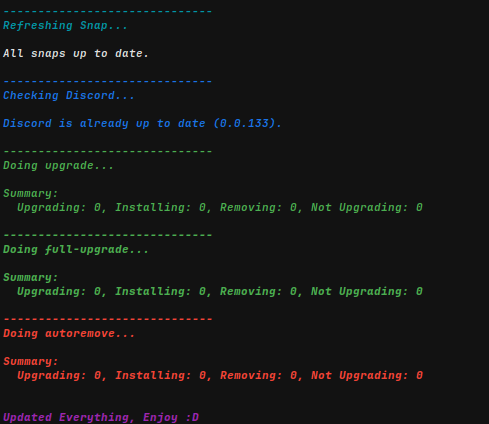
Overall I like to make scripts that might be useful or customize anything I got nicely and conveniently. And I actually just wanted to make this conveniently public so I could easily update it after adding new stuff to github. Then it got more and more "production ready". I made some small additions to make it work on multiple Systems and made it kind of user friendly. I think I did, yes XD
You have to decide that for yourself though. I really like how it is looking right now.
Before GitHub
So before I had this repo I just used https://server.master3307.org, my Fileserver made from CopyParty, to host the .bashrc_custom file. It was horrible XD
I had to open the file in https://server.master3307.org and edit it there each time I wanted to update it. That got really annoying really quickly. So I simply made this GitHub repository to publicly host the files and edit them from my home PC via Kate at first.
Now I use VS Code for editing the code though. I enjoy it and I used it some time ago with https://home.master3307.org... (purely written with AI btw. Using GitHub Copilot and ChatGPT at the time.)
Final thoughts
I am insanely glad that I made this and that people I showed this to find it pretty cool. If you, dear reader, are interested in contributing, feel free. Really.
I would be very happy.
Have a great day! :D